

A story bible in Obsidian: how far the vault goes
Obsidian is where story bibles go when spreadsheets stop being enough, and for good reason. It is also a general-purpose tool holding a very particular kind of knowledge, and the gap between those two things widens as the story gets long.
There is a moment every Obsidian story bible arrives at eventually. You type [[Marcus]] in a new note, and the autocomplete offers two of them, because somewhere around chapter fifty you introduced a second Marcus and gave him his own note in a different folder. The link still works. It just stopped meaning one thing, and from here on the vault needs you to be careful in a way it never asked before.
Nothing is wrong with the vault. It is doing exactly what a pile of linked markdown does. The question this guide answers is how far that carries a story bible, what to do to make it carry further, and how to leave with everything intact when you decide the bible needs a tool that knows what a story is.
What Obsidian gets right
The case for keeping a bible in Obsidian is strong, and worth stating properly, because most switching advice skips it.
The files are yours, on your disk, in plain markdown. No account, no sync dependency, no company between you and your notes. Markdown will outlive every writing app now trading, including ours. For a bible you intend to keep for a decade, that is not a small thing.
Links are first-class. [[Verony]] while drafting a note costs nothing, and over a year those links accumulate into a real map of who touches what.
It is free, endlessly extensible, and the community has already built a plugin for whatever you are about to want.
If your bible is working, none of what follows is a reason to move today. It is a map of where the edges are.
The vault that lasts longest
An hour of structure buys years of use, and every habit below also makes the vault more portable, to any tool, later.
One folder per kind of thing. Characters/, Locations/, Factions/, Items/. Folder names are the only signal a future tool, or a future you, can read at a glance.
One name, one note. The second character called Shadow gets a qualified note name from birth. Every scanner, search and link in every tool, Obsidian included, resolves names, and duplicates make every resolution a guess.
Aliases in frontmatter, not in prose. If the Gull Warden is also "the warden", record it as an aliases: list. Frontmatter is the part of a note machines can read reliably.
Prefer frontmatter properties to plugin syntax. age: 34 in frontmatter is portable markdown. The same fact inside a Dataview query is not, for reasons two sections down.
Keep the manuscript out of the bible folders, either in its own Chapters/ folder or under the Longform plugin. Mixing prose and reference notes in one folder costs you the folder-level signal everything else relies on.
The two limits
Bare links stop scaling with the cast. Obsidian resolves [[Marcus]] to the nearest unique match, so the day a name stops being unique, every existing bare link keeps working while every new one needs a path. You will not notice on the day it happens. You notice months later, spot-checking why a connection points somewhere strange.
Plugin structure is not markdown. Dataview fields and queries render beautifully inside Obsidian and are invisible everywhere else. Export a note, open it in anything, and the query is a code fence; the inline field is a stray Key:: value in your prose. A bible whose structure lives in plugins is locked in, in exactly the way plain files promised not to be. If half your bible's intelligence is Dataview, that half does not leave, to us or to anywhere.
What a note cannot say
The deeper limit is not Obsidian's fault, because no folder of documents fixes it.
A note records that the sword is broken. It cannot record when it broke, in story terms: which chapter, so that a recap for chapter 30 does not mention it, and a continuity check at chapter 60 knows it can no longer be drawn. A serial writer's real questions are almost never "what is true", they are "what was true as of the chapter the reader is on", and a document has no idea what a chapter is.
You can fake it with headings and discipline, and many vaults do. But it is the one part of a story bible that is a data model, not a filing system, and it is the honest reason to move a bible into a tool built for one.
Leaving with everything
PullAtlas imports an Obsidian vault directly. Drop the vault folder, or a zip of it, on the import surface and it reads the structure you already built.
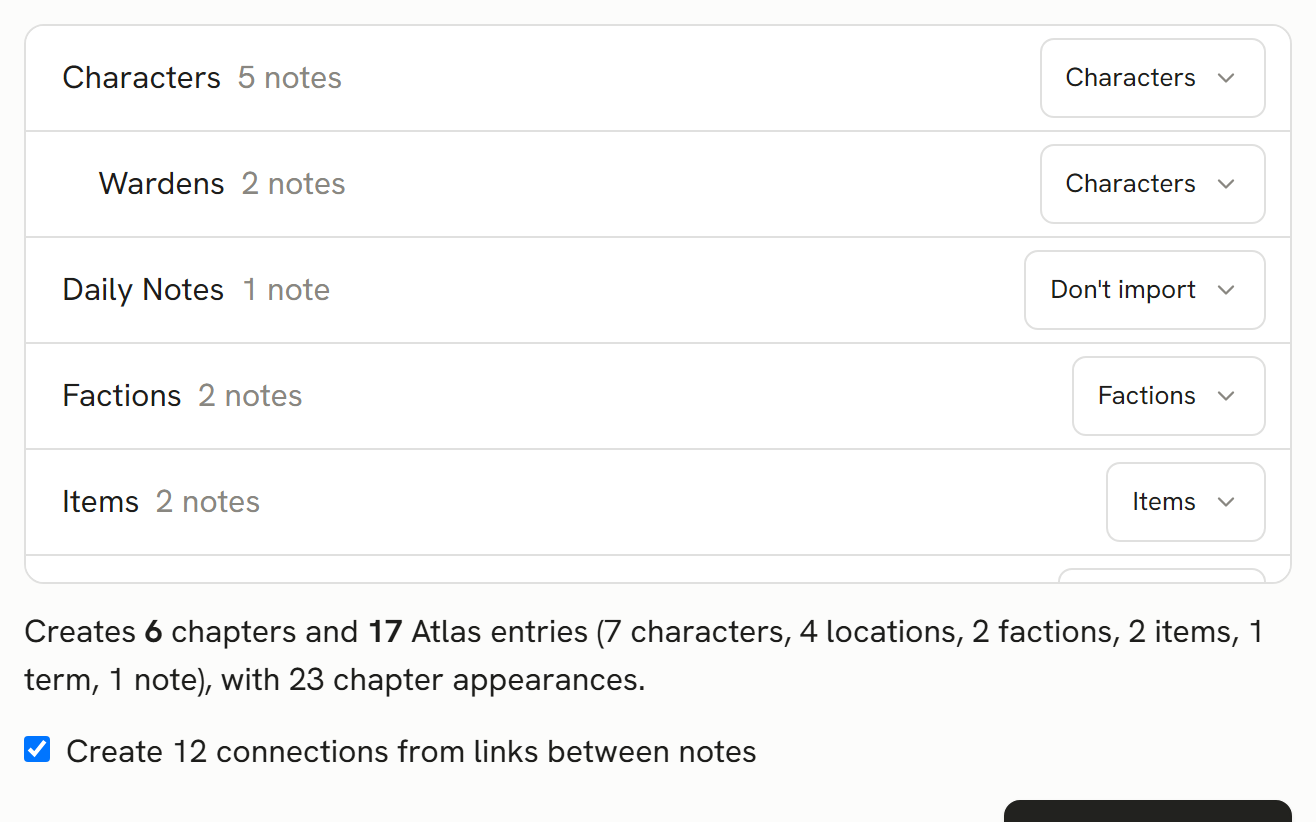
Nothing is created until you approve a preview. Every folder appears in a mapping tree: Characters/ is already set to become characters, Locations/ to locations, and every folder is overrideable, including to "Chapters (manuscript)" or "Don't import". Subfolders inherit from the nearest mapped ancestor, so Characters/Villains/ follows Characters/ until you say otherwise.
What maps where:
- Frontmatter
aliasesbecome aliases, including the deprecated singularaliasolder vaults carry. - Frontmatter properties become custom fields on the entry, and full-line
Key:: valuefields are lifted too, then removed from the body text they came from. - The note body becomes the entry's About text, and its first paragraph becomes the summary.
- Wikilinks between imported notes become connections, as an opt-in toggle with the count shown, because a dense vault becomes a hairball if you let it. Aliased links resolve through the alias table.
- A Longform project, or any folder you map to chapters, becomes real chapters, and wikilinks from chapter notes to bible notes become appearance records, so the new bible already knows who shows up where.
Templates/,Daily Notes/,Clippings/, attachments and.obsidian/default to "Don't import".
Collisions are handled out loud. Two notes with the same name get deterministic renames, shown in the preview and listed in the report. Ambiguous bare links are reported as unresolved rather than guessed at.
What survives the move
Everything above, and the report says so specifically: how many entries by type, every rename, every link it could not place, every field that was shortened. Images and attachments stay behind, counted, because the bible's text is what the move is for.
And the door swings both ways. PullAtlas exports your story bible back out as an Obsidian vault, one markdown note per entry, frontmatter, wikilinks and all, on every plan, whenever you want it. The round trip is part of our test suite. A bible that arrived from open formats should be able to leave as one, and yours can.
More guides